
Fun in Exchange Account Setup Guide: Registration, Login & Security Tips
Setting up an online exchange account can seem confusing when you are using a platform for the first time. New users may have questions about registration, account verification, login credentials, security settings, mobile access, and how to navigate the dashboard.
This Fun in Exchange Account Setup Guide is designed to help beginners understand the general process of creating and securing an account on an online exchange-style platform. It explains the important steps involved in account setup, what information users may need, how to protect login details, and what to do when common registration or login problems occur.
What Is a Fun in Exchange Account?
A Fun in Exchange account provides users with access to the features and services available through the platform.
Depending on the current platform structure, an account dashboard may provide access to areas such as:
- Sports markets
- Exchange markets
- Live events
- Account balance
- Transaction history
- Profile settings
- Security options
- Customer support
The exact features can change over time.
A new user should spend some time understanding the dashboard before making any financial transaction.
Why Proper Account Setup Matters
A correct account setup is important for both convenience and security.
Entering incorrect information during registration can create problems later, particularly if the platform requires identity verification or account recovery.
A properly configured account can make it easier to:
- Log in securely
- Recover a forgotten password
- Complete verification
- Review account activity
- Manage payment information
- Contact customer support
- Protect personal information
For this reason, beginners should avoid rushing through the registration process.
Before Creating a Funinexchange Account
Before registration, users should prepare a few basic things.
Use Your Own Information
Always provide accurate information associated with your own identity where required.
Do not create an account using another person’s personal information.
Check Eligibility
Confirm the applicable minimum age and legal requirements before registering.
Real-money gaming and betting regulations can differ between jurisdictions.
Use a Secure Device
Create an account from a trusted smartphone or computer.
Avoid public computers when entering sensitive personal information.
Prepare a Secure Password
Choose a strong password that is unique to the account.
Do not use the same password across multiple websites.
How to Set Up a Funinexchange Account
The exact registration interface can vary, but the general process is usually straightforward.
Step 1: Visit the Verified Website
Start by accessing the official Fun Exchange website or an approved access method.
This is one of the most important steps.
Avoid clicking registration links from unknown social-media accounts, messaging groups, or random advertisements.
Before entering personal information, check the domain carefully.
Step 2: Find the Registration Option
Look for a button such as:
- Register
- Sign Up
- Create Account
- Join Now
Select the appropriate option to open the registration form.
Step 3: Enter Your Details
Depending on the platform, the registration form may request information such as:
- Name
- Mobile number
- Email address
- Username
- Password
- Other verification information
Only provide information through the verified website or official application.
Check every field before submitting the form.
Step 4: Create a Strong Password
A strong password should be difficult for another person to guess.
Avoid using:
- Your name
- Date of birth
- Mobile number
- Simple number sequences
- Common passwords
- Repeated characters
A password manager can also be useful for creating and storing unique credentials.
Fun in Exchange Account Setup Guide
- Step 5: Verify Your Contact Information
- Step 6: Complete Additional Verification
- Step 7: Review the Terms
- How to Create a Secure Fun Exchange Password
- Protecting OTPs and Verification Codes
- Setting Up Your Profile
- Understanding the Account Dashboard
- Fun Exchange Account Setup on Mobile
- Fun Exchange Account Verification
- Why Account Verification Can Take Time
- Deposits After Account Setup
- Understanding Withdrawals
- Common Fun Exchange Registration Problems
- How to Recover a Fun Exchange Account
- Fun Exchange Login After Account Setup
- How to Keep Your Fun Exchange Account Secure
- How to Identify Fake Fun Exchange Websites
- Avoid Unofficial Agents
- Responsible Use of a Fun Exchange Account
- Avoid Chasing Losses
- Frequently Asked Questions
- What is the Fun in Exchange Account Setup Guide?
- What information may be needed for registration?
- Should I use my real information?
- How can I protect my account?
- What should I do if I forget my password?
- Why might account verification be required?
- Can I set up an account on mobile?
- Is it safe to use an unofficial APK?
- Can I create multiple accounts?
- Final Thoughts
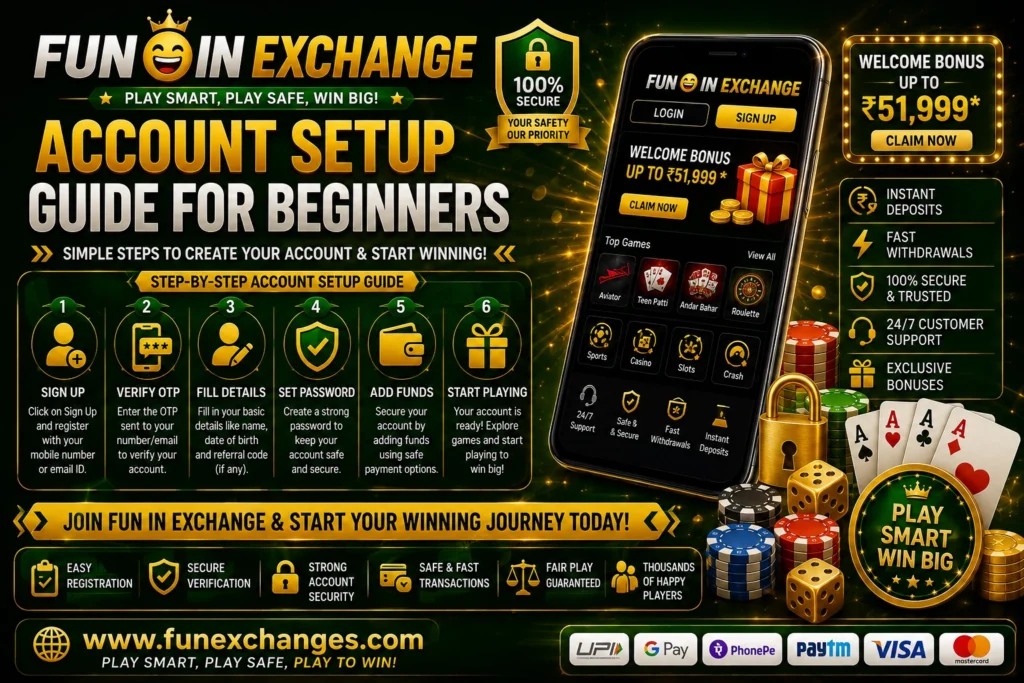
Step 5: Verify Your Contact Information
Some platforms may require verification through an OTP, email link, or another authentication method.
If an OTP is required, enter it only on the official verification page.
Never send the code to another person.
Step 6: Complete Additional Verification
Depending on the platform’s current requirements, users may need to complete additional account verification.
The purpose of verification can include confirming identity, meeting regulatory requirements, or protecting accounts from unauthorized access.
Follow the instructions provided through official channels.
Step 7: Review the Terms
Before using the account, read the platform’s current terms and conditions.
Pay particular attention to:
- Age requirements
- Account restrictions
- Deposit rules
- Withdrawal conditions
- Verification requirements
- Responsible-gaming policies
- Account closure rules
Understanding these conditions can prevent problems later.
How to Create a Secure Fun Exchange Password
Password security is one of the most important parts of account setup.
A good password should be:
- Unique
- Long enough
- Difficult to guess
- Different from passwords used elsewhere
Consider using a combination of letters, numbers, and symbols where supported.
Do not share your password with friends, relatives, agents, or people claiming to provide technical support.
If someone asks for your password, treat the request as suspicious.
Protecting OTPs and Verification Codes
One-time passwords and authentication codes are designed to verify that the person accessing an account has control of the registered device or contact method.
These codes should remain private.
Never share an OTP with:
- Unknown callers
- Social-media contacts
- Messaging-group administrators
- Unofficial agents
- People claiming to be customer support
A legitimate support representative should not need your confidential authentication code to access your account on your behalf.
Setting Up Your Profile
After registration, users may be able to complete their profile.
Depending on the available features, the profile section can include:
- Personal details
- Contact information
- Security settings
- Verification status
- Account preferences
- Transaction information
Keep your information accurate.
If your contact details change, follow the official procedure for updating them.
Understanding the Account Dashboard
The dashboard is usually the central area of an online exchange account.
Beginners should take time to identify important sections.
Account Balance
This area may display available funds or account-related balances.
Always confirm that the displayed amount matches your transaction history.
Sports or Exchange Section
This is where users may find available markets.
The exact selection can vary.
Transaction History
Transaction history can help users review deposits, withdrawals, and other account activity.
Regularly checking this information can help identify unusual transactions.
Profile and Security
This section may provide options for changing passwords or updating account details.
Support
The support section can provide official channels for resolving account-related issues.
Fun Exchange Account Setup on Mobile
Many users prefer smartphones because they can access online platforms conveniently.
If mobile access is supported, the account setup process may be completed through a mobile browser or official application.
For safe mobile registration:
- Keep your operating system updated.
- Use a secure screen lock.
- Avoid public devices.
- Use a trusted internet connection.
- Install applications only from verified sources.
- Do not save sensitive credentials on shared phones.
If an official application is available, verify its source before downloading it.
Avoid modified APK files promoted as “unlocked,” “hacked,” or “guaranteed-winning” versions.
Fun Exchange Account Verification
Verification can be an important part of account setup.
A platform may request additional information to confirm the identity of the account holder.
Verification requirements can vary depending on the service and applicable regulations.
Users should:
- Follow the official verification instructions.
- Provide accurate information.
- Upload documents only through secure official channels where required.
- Avoid sending documents to unknown individuals.
- Keep copies of important records where appropriate.
Never upload identity documents to a website unless you have verified that it is the legitimate service.
Why Account Verification Can Take Time
Verification may not always be immediate.
Possible reasons for delays include:
- High verification volume
- Incomplete information
- Incorrect details
- Document quality problems
- Additional security checks
- Regulatory requirements
If verification is delayed, avoid repeatedly submitting different information.
Instead, check the official support instructions.
Deposits After Account Setup
If real-money services are available and legally permitted for you, you may need to fund the account before participating.
Before making a deposit, review the current payment conditions.
Check:
- Supported payment methods
- Minimum deposit
- Maximum deposit
- Processing times
- Verification requirements
- Applicable fees
Only use the official payment process.
Never send money to an unknown person who claims to be an agent or representative.
Understanding Withdrawals
Users should review withdrawal conditions before depositing.
Important information may include:
- Minimum withdrawal amount
- Maximum withdrawal
- Processing time
- Identity verification
- Available withdrawal methods
- Account restrictions
- Applicable fees
Understanding these rules in advance can help avoid unnecessary confusion.
Common Fun Exchange Registration Problems
Even when the setup process appears simple, users can encounter technical problems.
Registration Page Does Not Load
Try:
- Checking your internet connection.
- Refreshing the page.
- Updating your browser.
- Clearing browser cache.
- Trying another supported browser.
If the issue continues, check whether the platform has reported a temporary service problem.
Mobile Number Already Registered
This may indicate that an account already exists using the same number.
Instead of creating multiple accounts, use the official account-recovery process.
OTP Not Received
Check your mobile signal and messages.
Make sure the correct phone number was entered.
Avoid repeatedly requesting codes in a short period.
Email Verification Not Received
Check your spam or junk folder.
Confirm that the email address was entered correctly.
Password Not Accepted
Check capitalization and typing errors.
If you cannot remember the password, use the official password-reset option.
How to Recover a Fun Exchange Account
If you lose access to an account, do not immediately create another account using different information.
First, look for the official account-recovery or password-reset option.
A typical process may involve:
- Selecting “Forgot Password” or a similar option.
- Entering the registered account information.
- Completing identity or contact verification.
- Receiving a recovery code or link.
- Creating a new password.
- Logging in again through the official website.
The exact process depends on the platform’s current system.
Fun Exchange Login After Account Setup
Once registration is complete, login should normally require the credentials created during registration.
Before logging in:
- Confirm the website address.
- Check your internet connection.
- Use your correct username or registered contact information.
- Enter the correct password.
- Complete any required verification.
If you are using a shared device, avoid saving your credentials.
Always log out when finished.
How to Keep Your Fun Exchange Account Secure
Account security should continue after registration.
Use a Unique Password
Do not reuse your Fun Exchange password on other websites.
Enable Extra Security
If additional authentication options are available, consider using them.
Monitor Account Activity
Review transaction history and login-related notifications.
Avoid Phishing
Never enter your password on suspicious websites.
Keep Your Device Updated
Install security updates for your operating system and browser.
Protect Your Email and Phone
The email address or mobile number connected to your account should also be secured.
How to Identify Fake Fun Exchange Websites
Fake websites can look similar to legitimate platforms.
Warning signs may include:
- Strange domain spelling
- Unexpected redirects
- Excessive pop-ups
- Requests for confidential information
- Unusual payment instructions
- Claims of guaranteed winnings
- Pressure to act immediately
If a page looks suspicious, do not enter your credentials.
Instead, close it and access the verified website through a trusted route.
Avoid Unofficial Agents
Some users may encounter individuals online claiming to provide account setup, deposits, withdrawals, or technical support.
Be cautious.
Never give an unknown person:
- Password
- OTP
- PIN
- Full payment credentials
- Remote access to your device
Use official support channels whenever possible.
Responsible Use of a Fun Exchange Account
If the account provides access to real-money sports betting or gaming, responsible use is essential.
Users should establish a clear financial limit before participating.
Never use:
- Borrowed money
- Emergency savings
- Rent money
- Essential household funds
- Money needed for bills
Real-money gaming should be treated as entertainment rather than guaranteed income.
Avoid Chasing Losses
One of the most important responsible-gaming principles is avoiding the attempt to recover losses by increasing stakes.
For example, losing ₹500 does not mean that risking ₹1,000 is a sensible way to recover it.
The second amount can also be lost.
Set a budget in advance and stop when that limit is reached.
Frequently Asked Questions
What is the Fun in Exchange Account Setup Guide?
It is a beginner-focused explanation of the general process involved in creating, verifying, securing, and accessing an online exchange account.
What information may be needed for registration?
Depending on the platform, registration may require a mobile number, email address, username, password, and additional verification information.
Should I use my real information?
Where verification is required, users should provide accurate information belonging to the actual account holder.
How can I protect my account?
Use a unique password, protect OTPs, avoid suspicious links, keep devices updated, and use official access methods.
What should I do if I forget my password?
Use the official password-recovery option rather than asking an unknown person for assistance.
Why might account verification be required?
Verification may be required for identity confirmation, account security, or compliance with applicable rules and regulations.
Can I set up an account on mobile?
If mobile registration is supported, users may be able to create and access an account through a mobile browser or official application.
Is it safe to use an unofficial APK?
No. Unofficial or modified applications can create security and privacy risks. Use only verified application sources.
Can I create multiple accounts?
Account rules vary by platform. Users should read the current terms before creating additional accounts and should not use multiple accounts to bypass restrictions.
Final Thoughts
This Fun in Exchange Account Setup Guide provides beginners with a practical overview of the steps involved in creating and securing an online exchange account.
The registration process itself is usually straightforward, but users should pay close attention to accuracy and security. Always access the verified website, provide correct information, create a strong password, protect OTPs, and complete any required verification through official channels.
After registration, take time to understand the dashboard, transaction history, security settings, and support options before using any financial features.
For users who have access to real-money betting or gaming services, responsible financial management is equally important. Never use borrowed or essential household money, never chase losses, and do not treat betting as a guaranteed source of income.
Finally, always check the latest terms, legal requirements, age restrictions, payment conditions, and responsible-gaming policies applicable to your location. A careful account setup combined with strong security habits can help create a safer and more informed online experience.